
My son wrote a simple timesheet application in Electron and Vue. I wrote a backend to it for my wife. She has three computers, an iPad and an iPhone. A Surface for work, an iMac in her office, and an old MacBook on the dining room table opposite mine. When she comes in for a cup of tea, there is no telling which device will be used to mark that she is on a break!
I've created a sample on ReplIt to show how I did this. It's called Live.
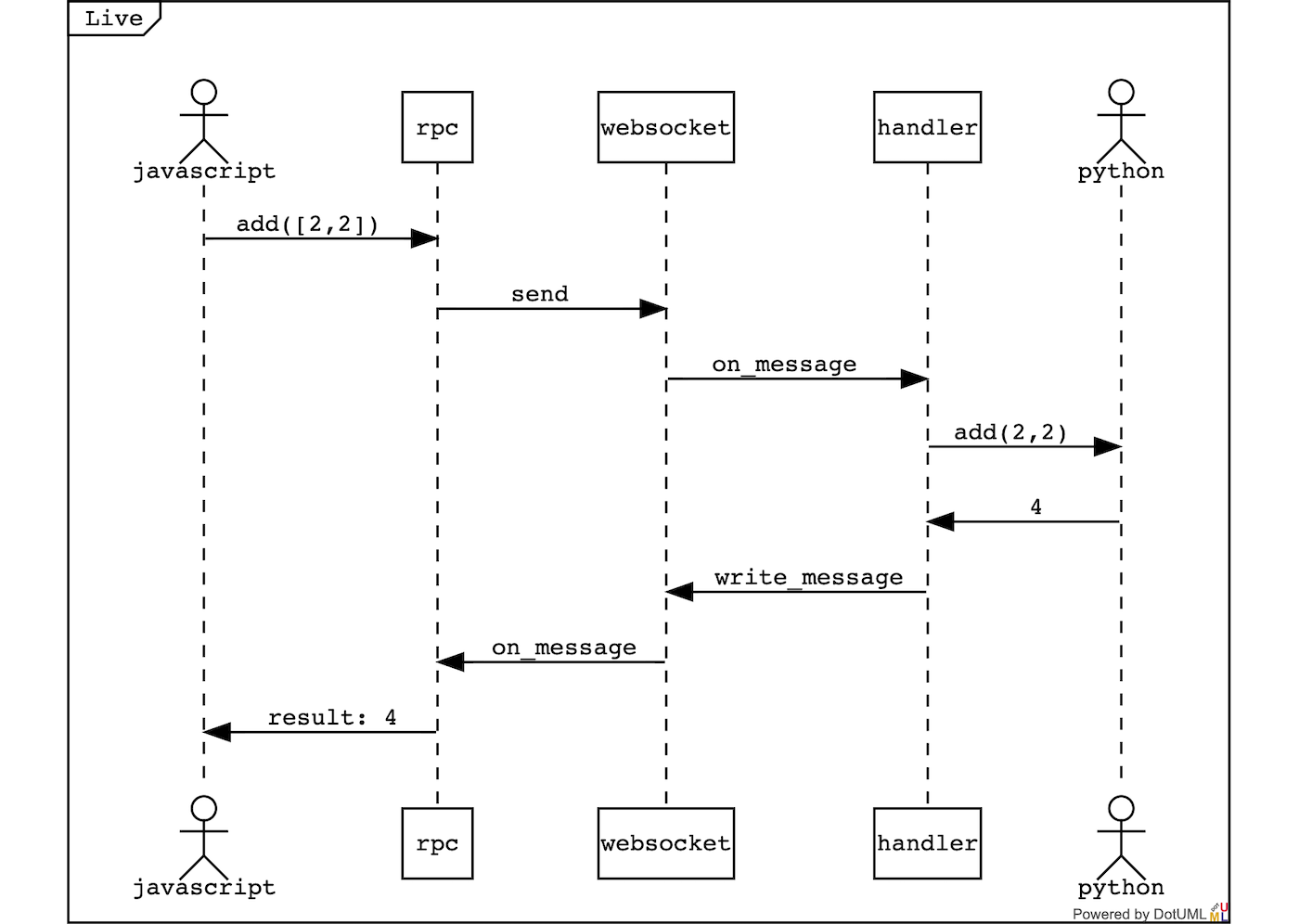
Live is a simple Remote Procedure Call implementation. It uses a Python tornado websocket and a JavaScript proxy to link JavaScript code to Python and back again. If we look at our JavaScript we can walk through the code to our Python functions.
It all begins with a JavaScript websocket in the browser:
// WebSocket initialization
We add three handlers to our websocket: onopen, onmessage and onclose. Open and Close manage the status of our websocket. The heart is in onmessage:
// Message handler that parses incoming JSON
// Tests for message id to find prior Promise
// Calls resolve for results or reject for errors
// Updates state for broadcasts
This event handler parses the incoming evt.data with JSON.parse. All our messages will be JSON. It then tests to see if the message has an id and uses that id to find a prior Promise.
Finding a promise will result in the message calling either resolve for a result or reject for an error. If the message does not have an id then it must be a broadcast and state is updated.
So how do we generate the promises? We expose a Proxy property called api:
// Proxy api getter
// Takes params - can be Object or Array per jsonrpc 2.0 spec
Our api has a getter - it gets a function which takes params - in the jsonrpc 2.0 spec it suggests that params can either be an Object or an Array. So lets say we have a python function:
async def add(a:int, b:int)->int
In JavaScript we can call either:
rpc.api.add([2,2])
or
rpc.api.add({a:2, b:2})
The function marshals our request object and returns a Promise. That is the promise that will be resolved or rejected by the response coming into onmessage.
This implementation does not follow too closely the jsonrpc 2.0 spec. It fails to handle standard errors, but the spec fails to define notifications (messages without id attributes). But it's simple and worth investing in. The spec also allows for multiple messages to be sent.
So we've sent our message and we're ready to handle a response. Let's move to Python and see what happens there.
A tornado.websocket.WebsocketHandler subclass overrides three methods: open, on_message, on_close. The open and on_close are state managers, like in JavaScript. The work is done in on_message:
# on_message loads JSON data
# Could validate jsonrpc version and method existence
# Calls the method with params
We loads our JSON data and have a message. Here we could validate the version of jsonrpc and see if our method existed and that our params were correct. But no, let's go for gold and call the method. The _params_ is a function to turn three lines into one:
# _params_ function for handling params
I lied, there is some error checking. So how do we expose our procedures, python functions? Simple, I've given our Websocket a class property called procedures and a decorator:
# Decorator to augment RPC procedures
# Not a traditional decorator - augments Rpc data
Strictly speaking, it's not a decorator as it doesn't wrap the function, but augments the data of Rpc. And we use it thus:
@rpc
async def my_function():
    pass
Our result is returned in a response carrying the same id as the request and on_message in JavaScript will call its cached resolve.
This performs each method sequentially — to allow for long-running code we can schedule our procedure by using:
# Scheduled async handling
Then perform is just the body of our on_message method. You can see an example of this in the tests using the long method.
This is the UI. Using reflection, it could be auto-generated. The onsubmit calls a global scope function.
<!-- Form with onsubmit handler -->
and the JavaScript of that function:
// Function to handle form submission
// Converts data to params
There is an unnecessary step in this — converting the data to params, but I wanted to show using an Array, as well as an Object, for params - and to convert the values to integers.
Chat is an essential pattern and can be implemented like this:
# Broadcast function
# Relays message to all clients
The broadcast function relays the message to all clients:
# Implementation of broadcast to all connected clients
The JavaScript on_message just updates state:
this.state.broadcast = message
But you will see it is so much more than chat when you synchronize data between server and client. My use of action is intended to pre-figure a use with Vuex…
We have two choices here:
This could be oauth or basic-authetication. It's implemented by having a login page and handler. Then the cookie is already in the WebSocket request and the WebSocket rejects any open without a valid cookie.
This means we place a cookie and cookie_name attribute in the response object and the WebSocket is responsible for placing the cookie into the document with a standard javascript set_cookie function like this:
// set_cookie function implementation
With a single-page app you might like to expose functions that do not require the user to be authenticated. So the login function is the most versatile method I use. The first message down the web socket is a profile object carrying the user's details. If they are not logged in this message carries a null value for the profile and a login modal is shown.
So if you are tempted to write a GraphQL or REST application, stop and consider an Rpc. It's lightweight, fast, robust, and simple to extend. REST spends too much time exposing CRUD and mapping verbs. GraphQL exposes a query language that cannot be good for caching, optimizing, or securing. It also requires so much typing — (he says writing an article for fun). Our servers provide views on our models, so by defining elegant functions, we can cache, be versatile by being fleet, and optimize where necessary. The next step is to show how you plug a model into this asynchronous world.
Resources: