
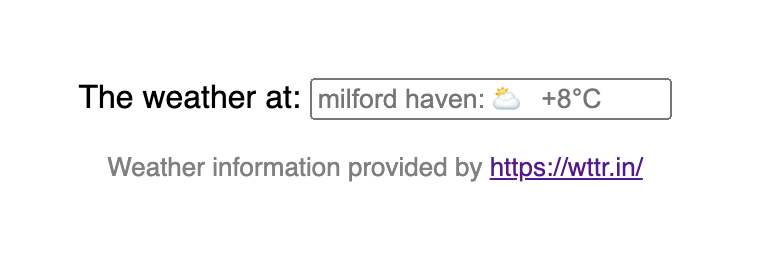
The weather is all-important; I'm British. I live in 'Westest' Wales and I like to say we have every weather every day. So I thought it would be a good idea to show the weather in the menubar of my Vue site.
My inspiration was a curl sent to me by a friend concerned the weather was not good that day in Wales:
curl 'http://wttr.in/milford%20haven?format=3'
On my terminal there was bright coloured icon of the rendered unicode character for sunny, but cold. milford haven: ⛅ +1°C. The documentation for wttr.in can be found here — the tool is amazing.
I don't remember how I came to think of using the placeholder attribute of an input or that I found that the browser rendered unicode in a placeholder.
Always looking to save space and make things neat, minimalism overcame me and resulted in the following:
Using weather input - it's just one page, and the template is just four lines:
<div id="app">
  The weather at:
  <input
    size="24"
    :placeholder="state.weather"
    v-model="state.location"
    v-on:keyup.enter.prevent="fetch_weather"
  >
</div>
The secret sauce is the dynamic placeholder. Vue will replace the value of placeholder every time we change state.weather. When there is no value for state.location, the browser falls back to the value of placeholder.
The enter key event, which prevents the default behaviour, calls our function fetch_weather:
async function fetch_weather() {
  let protocol = document.location.protocol;
  let location = encodeURI(state.location ? state.location : 'milford haven');
  let url = `${protocol}//wttr.in/${location}?format=3`;
  let response = await fetch(url);
  state.weather = await response.text();
  state.location = null;
}
wttr.in will answer to http or https, but the browser would have us stay in the protocol we arrived with - that's line 1. Line 2 makes state.location more URL-ish. Line 3 composes our request. This is an asynchronous function and we use the fetch api. When we're done we set state.location to null so that our new placeholder is visible.
The JSFiddle is below. I've cheated a bit. I'm fairly sure you are not intended to destruct Vue as if it were an import, but I wanted the code to look like a component using the composition api.
That is not the end of the story…
Placeholder has some discussion around it. Some are concerned that we should not use it. Placeholders in Form Fields Are Harmful. Placeholder first arrived in the HTML5 spec and its implementation in the browsers caused some concern. Two points stand out for me:
First: the contrast of the greyed text makes it hard to read and distinguish from user entered data.
Second: the hint, which is its purpose, disappears as you type.
The remedies are to not use the placeholder, add adequate hints to your layout and use the label to let users know what they can do. Basically, don't hide features or function. I'm guilty on all counts. My input magically responds to the enter key event! How do you know to enter a new location? How do you know it is an input box and not just a static weather report with a border for those who live in Milford Haven. It's not like the orange juice futures are dependent on the weather here!
A possible solution to the first point is:
:-webkit-input-placeholder { /* Edge */
  color: red;
}

:-ms-input-placeholder { /* Internet Explorer 10-11 */
  color: red;
}

::placeholder {
  color: red;
}
No, not the red, the styling. Using these selectors in your design could better contrast the placeholder content. I got this example from w3schools. There is also more discussion at MDN.
Before you dismiss the second point, consider a date input that uses the placeholder to tell the user the format required. As the user types, they may have forgotten that you require a four digit year or that month comes second. So they erase their first few digits to re-display the placeholder and start all over again. If you cannot empathise with this scenario, wait a few years. This is clearly demonstrated in this article by Eric Bailey and referred to as a short term memory problem.
So version two is a compromise. You can still place it in a menubar, and I've added a help button inside the input box that provides a tippy popup.
I could not find a unicode character for 'help' — so I went to feather icons and downloaded the source for help-circle and placed it in an svg node that is offset to the end of the input.
Weather input with tooltip - The result is the JSFiddle below:
The Vue3 composition api does make for more readable code. The variables are declared where you use them — I'm impressed, again.
To conclude, always read around, there is a bigger picture out there, but don't forget why you started something.